
Shared Photos Widget for Couples and Friends
View recently shared photos from your groups with our interactive widget. Bring your favorite people right to your Home Screen.
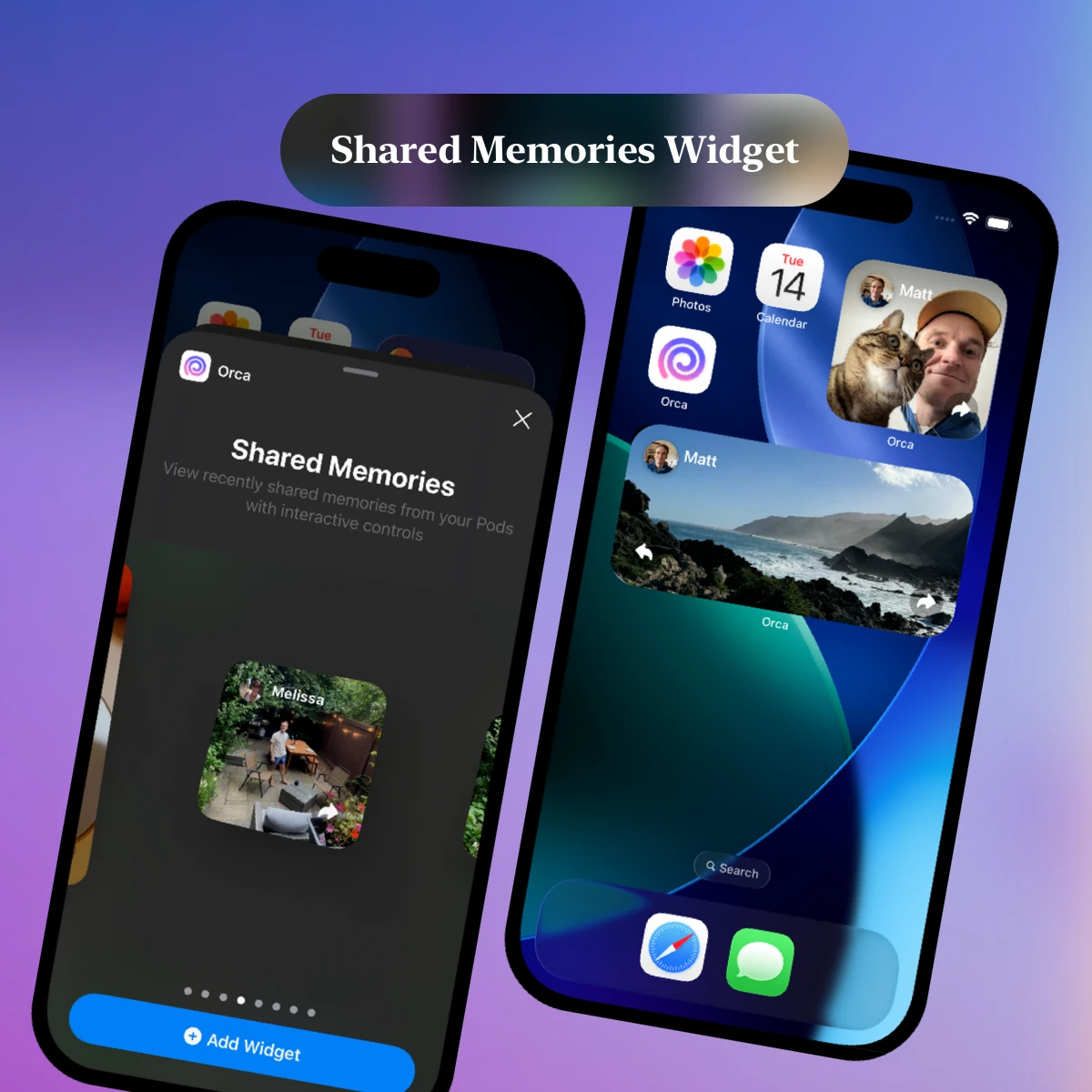
Last fall, we heard from a mother searching for a way to stay in touch with her college-bound daughter. She wanted a way to stay connected and see a glimpse of her daughter's university life, specifically via a photo widget. Her idea was a widget to see shared photos from a group with her family.
Orca had all of core features to make this possible - private group sharing via Pods and a recently-built Throwbacks Widget. How much more work would it be to create a new widget that surfaced shared photos? Each new photo could pop to the top of the queue, creating a unique way for families and friends to keep in touch.
I loved the concept and hoped to build this new widget within the coming month, though some other projects took priority (looking at you Android Video).
Today, I’m happy to announce a new way to share joy in Orca: the Shared Memories Widget.
Shared Photo Album for Friends or Family
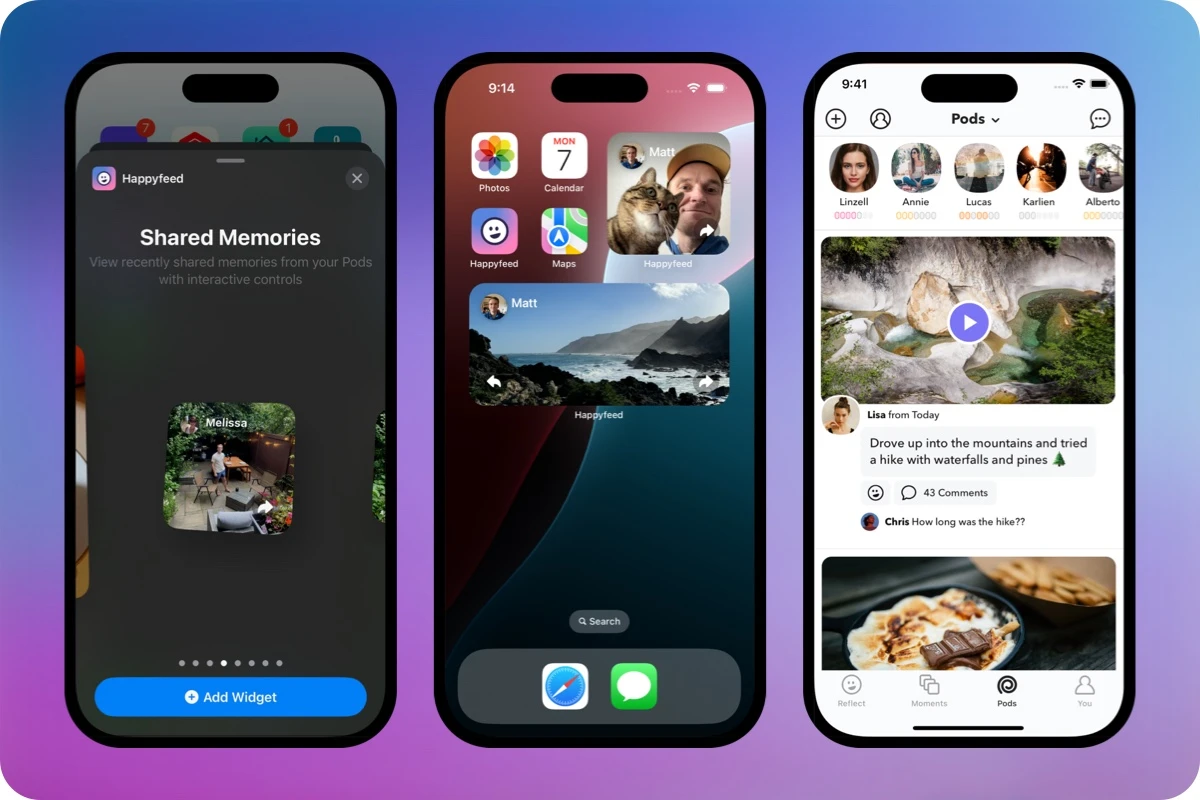
Sending photos to an iPhone widget adds an important element to sharing pics. Every time you open your device, there’s a chance to see something new. There’s no need to open the app, tap to the right page, and wait for anything to load. The difference may seem minor, but by removing a few small steps, widgets can add more delight and surprise to sharing. Using interactive buttons to the widget, Orca even allows you to tap through several photos, so you never miss a moment.
How it works:
- Add the Shared Memories Widget to your home screen to see recent photos shared with you via Pods or anyone you follow.
- Photos are added as they are shared - showing the most recent 7 memories, and displaying the latest one automatically
- Tap the arrow buttons to move back and forth between photos. Larger widgets have allow directions and the smaller version has one button.
- Videos work with the widget too. You’ll see a single frame from the video and can tap to open Orca Pods and watch the whole video.
- Note: Widgets do not currently work with Random Pods. We’re just not 100% comfortable with letting strangers put photos directly on your home screen (yet). You can follow Random Pod members directly though to view their photos.
The Shared Memories Widget is one of three widget options currently available in Orca. If you don’t want to join a group or share anything, you can also try out the Daily Throwback Widget or a simple widget that displays your latest entry in the app.
How to Add a Photo Widget
If you’re new to Orca or adding widgets to iOS, I’ll walk you through the full process of setting up our Shared Memories Widget and sending pics. The whole process shouldn’t take you more than five to ten minutes and it’s easy to get your friends or family started too.
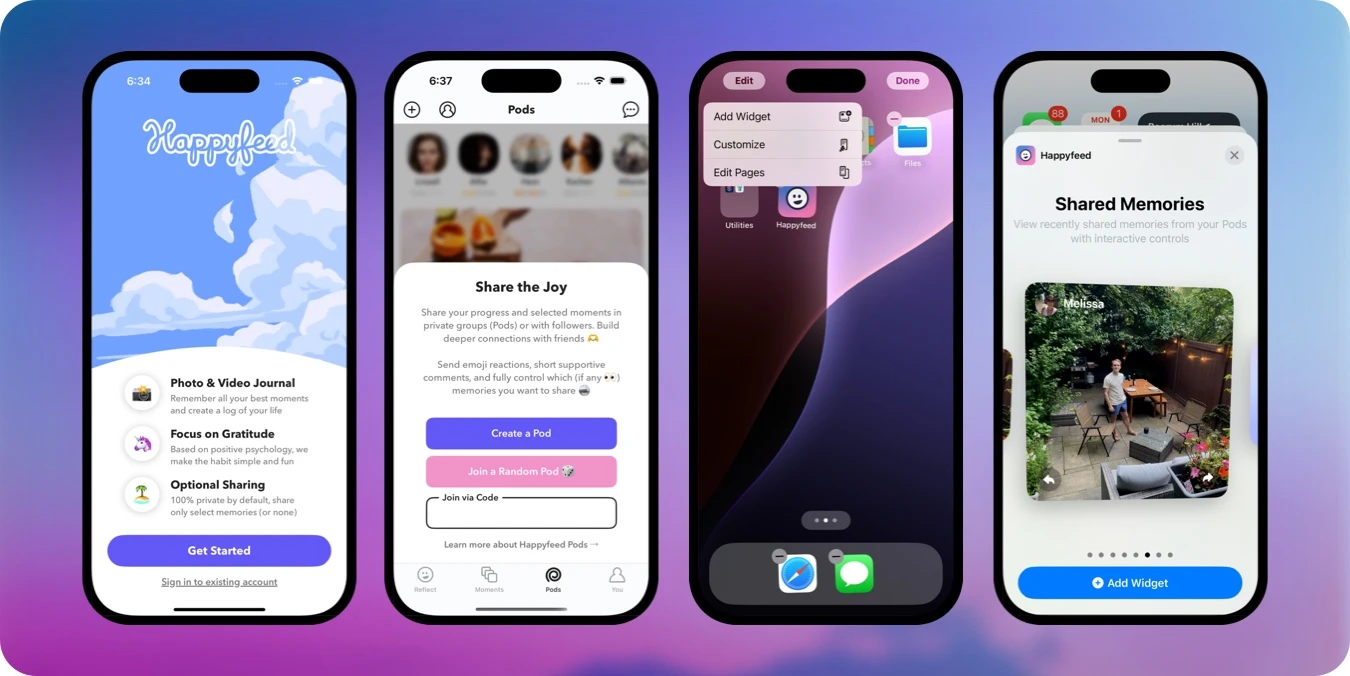
- Download the Orca app in the App Store.
- Create a free account with your email or Apple Sign Up.
- Navigate to the “Pods” tab in the app to create a group or join one using a code from a friend. When you create a new Pod, you simply give it a short name an emoji for quick recognition.
- To add the widget, open your iPhone or iPad Home Screen and hold anywhere until you see an “Edit” button in the top left corner of the screen. Tap the “Edit” button and select “Add Widget.”
- Use the search bar to find Orca and you’ll see all our widget options.
- Swipe left until you reach the “Shared Memories” widget and choose the size you prefer - small, medium, or large.
- With your account, Pod, and widget set up, you can send photos in Orca by uploading a memory from the Upload screen and tapping the 🌀 button to open the share menu (either during or after creation). Select any number of Pods and memories default to private.
Use Case: Couples Widget App
A perfect use case for the Shared Memories Widget for couples. Simply create a two-person Pod for you and your partner. It’s especially helpful for couples that in a long distance relationships or any spending more time apart than they’d like. Having an ever-changing window into your partner’s life via a widget is a gentle way to keep each other informed of little joys throughout your day. Orca is flexible, allowing you to think of your own daily themes and types of posts:
- Send each other a selfie each day, pets included when possible
- Pick a theme your partner loves: like a daily snack, flowers, clouds, or inside joke
- Use the photo for a motivational quote, especially if they are studying or working hard
- Take photos of yourself in new places that you can visit together someday
- Send memes or jokes you know will cheer up the other person
We’ve designed Orca for any close relationships, from couples to small groups of friends or family. For example, Orca includes an option to select default sharing rules. You could choose to send all your Orca memories to a specific Pod unless toggled off. This allows you to share photos without the extra work of remembering which memory to share with whom - especially perfect for couples.
There’s no limit to how many Pods you can join or how you send any individual memory to those groups. You can share moments with no one (keeping it private), with everyone (including followers), or select specific Pods. Some Pods have over one hundred members!
All-In-One Photo Widget
There are plenty of other photo widget apps available in the App Store, many that even focus on sharing photos between friends and couples. What makes Orca stand out is that it directly connects to the memories and relationships you’ve already created by journaling. This means that you can send a pic from “1 year ago” to your boyfriend, best friend, or mom's Home Screen with a few taps. They’ll be able to go even further by opening the shared memory in your Pods to send emoji reactions or leave a comment. It's a bit like a mini social network.
- Easily share your photos from daily throwback memories
- Open the app for more options, like commenting and emoji reactions
- Keep a history of the photos you send and receive
- Create new memories to send anytime, up to ten a day
On top of that, Orca is a full-fledged photo and video journaling app. It’s built to be an incredibly simple way to record daily moments, with a focus on positivity.
We started as a gratitude journaling app, so positivity is in our DNA.
Beyond sending pics back and forth between widgets, you can:
- Upload private photo and video entries for your eyes only
- Create groups, called Pods, to send only specific memories to
- Enjoy a variety of recap tools like: a shakeable gratitude jar, a monthly movie maker, and more
By fitting photo sharing into a habit of recording memories, you’re more likely to actually send photos to your friends. This works both ways - more sharing all around.
Free Photo Widget App
Orca is a free app with a optional paid version to unlock extra features, including more photos per day and longer videos. Widgets will always be included in the free version. We won’t make you sign up for a trial that you need to remember to cancel, and we won’t ever cut you off at some arbitrary number of uploads or days of use. Most people never pay and we're just grateful to see them finding value in the practice - many even using the app for over a thousand days.
Try it out and, if you do, be sure to let me know what you think. Always improving!
Download Orca for free.
April 12, 2025


Happiness Comes in Waves
Introducing a brand new way to share that requires reciprocity to help deepen your relationships. Plus, it's just more fun.
Private Instagram Alternative
How a group photo sharing app based on journaling can be used as a private social network

Best Journaling Apps, iOS 26 Support, Video
Featured in "Best Journaling Apps" in the App Store, design updates for iOS 26, and major improvements to video support on Android